---
title: Installing the ELD Engine Module
description: How to attach an emdecs one ELD engine module with its cable
---
[Skip to content](https://knowledge.brightorder.com/installing-the-eld-engine-module#main-content)
English
Show submenu for translations
[More support](https://knowledge.brightorder.com/kb-tickets/new?hsLang=en) [Customer portal](https://help.brightorder.com/tickets?hsLang=en)
[](https://knowledge.brightorder.com?hsLang=en)
Open main navigation
Close main navigation
- English
Show submenu for translations
- [More support](https://knowledge.brightorder.com/kb-tickets/new)
- [Customer portal](https://help.brightorder.com/tickets)
- Go to www.brightorder.com
Go to www.brightorder.com
How can we help you?
- There are no suggestions because the search field is empty.
1. [BrightOrder Knowledge Base](https://knowledge.brightorder.com/?hsLang=en)
2. [emdecs one ELD](https://knowledge.brightorder.com/emdecs-one-eld?hsLang=en)
3. [Getting Started](https://knowledge.brightorder.com/emdecs-one-eld?hsLang=en#getting-started)
# Installing the ELD Engine Module
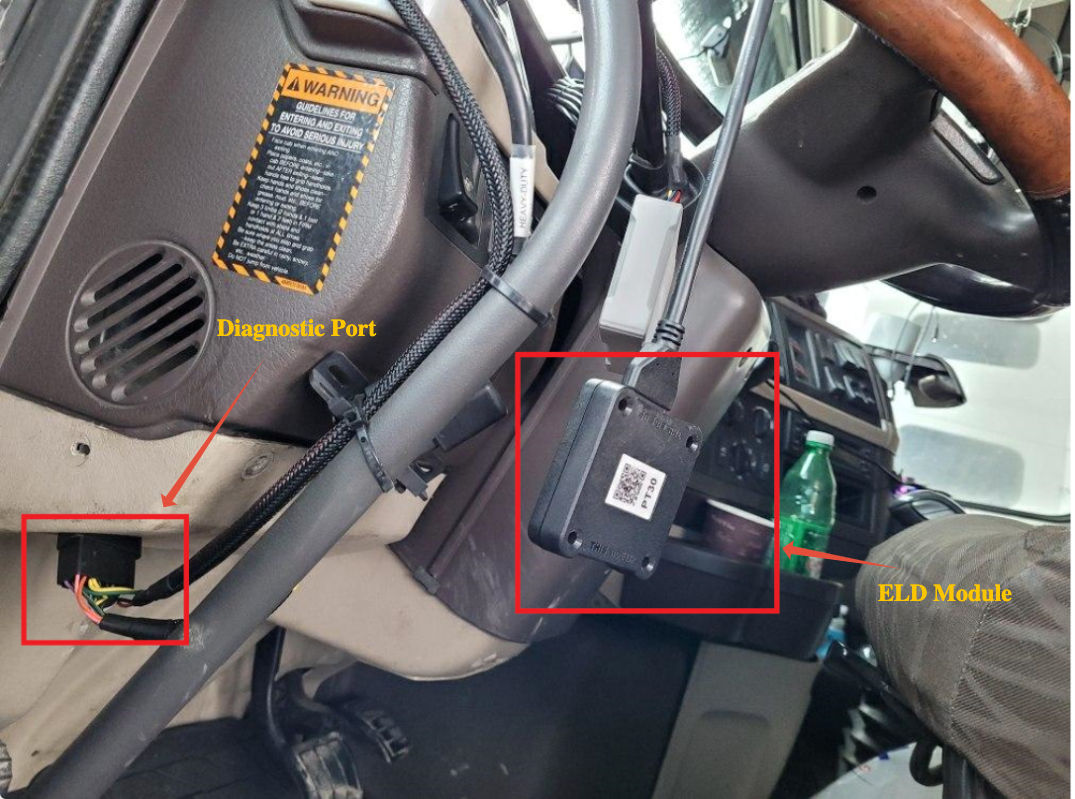
ELD Engine Modules are connected to the diagnostic port of the truck.
With **emdecs one ELD** you'll need different cables depending on the type/make/model/year of your vehicle. To find out which cable you should use, go here:[Determining ECM cable to use with the Switchboard Engine Module.](https://support.onswitchboard.com/articles/281396-determining-ecm-cable-to-use-with-the-switchboard-engine-module)
To purchase an emdecs one Engine Module cable, visit[the Switchboard online store.](https://shop.onswitchboard.com/)
If your ELD Engine Module is connected, you can visit the guide establishing a connection to the ELD Engine Module, visit the[guide on connecting to the ELD Engine Module here](https://support.onswitchboard.com/articles/768911-connecting-to-the-switchboard-eld-engine-module).
**General Installation Instructions**
If you need specific instructions on how to install the RP1226 Cable, visit the[guide on RP1226 Cable Installation here](https://support.onswitchboard.com/articles/285767-rp1226-cable-installation).
To connect the ELD module with the ELD cable:
1. Identify the latch connection on the ELD device. It will be side of the ELD device.
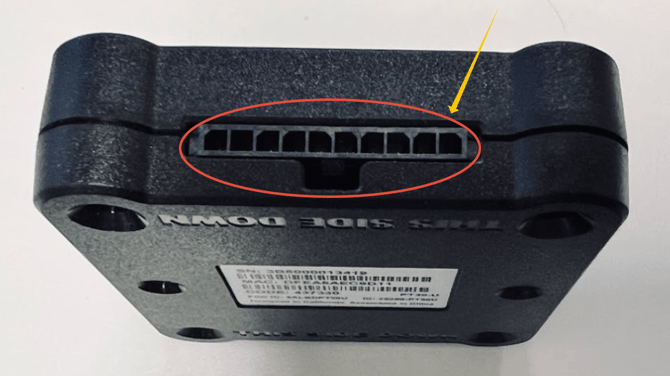
2. Identify the end of the cable to connect with the ELD device. For this example, we will use an RP1226 connector.
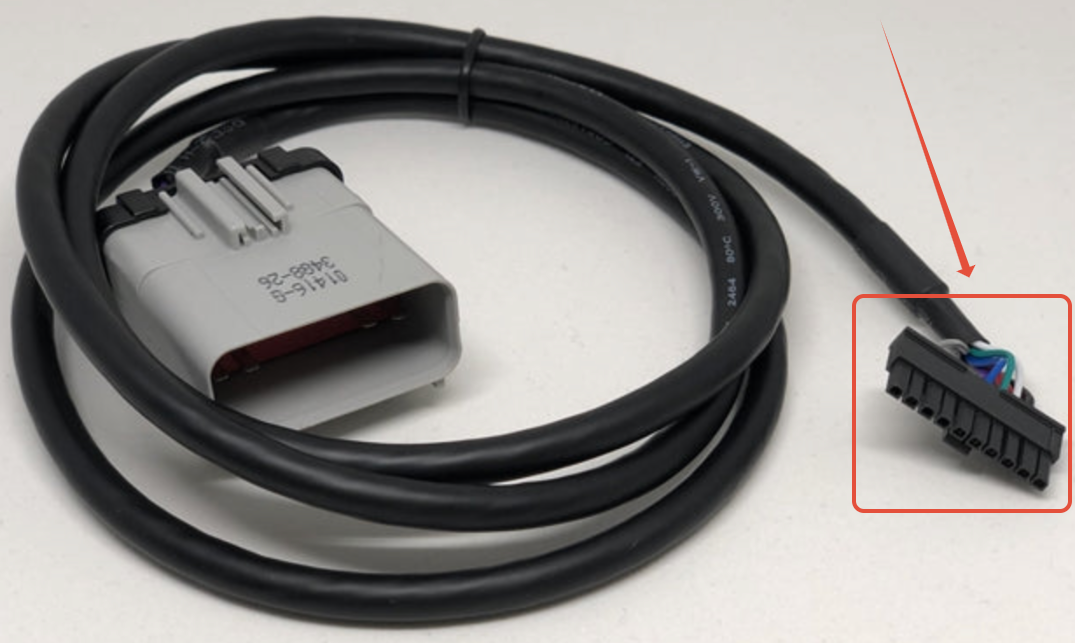
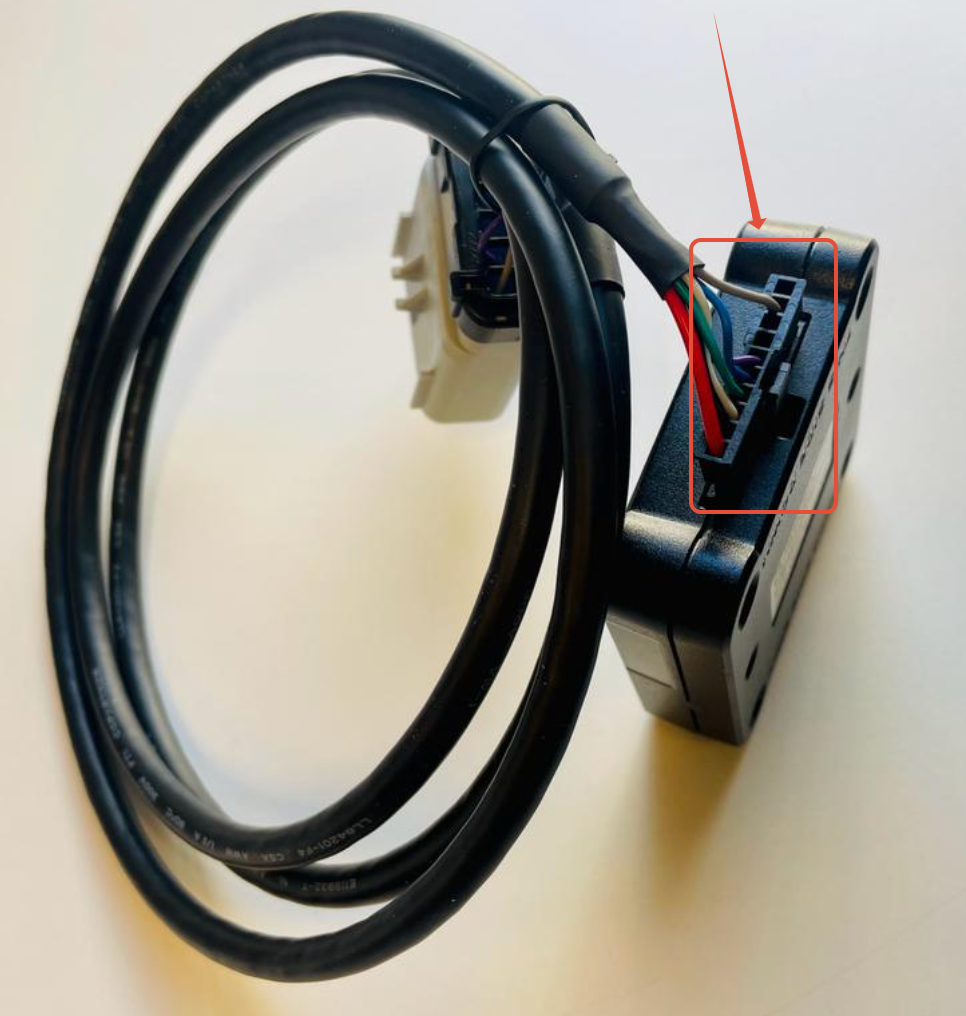
3. Connect the ELD module with ELD cable as shown below. You will hear a click sound once you connect the cable and the ELD module.
4. Connect the end of the ELD cable to the truck's diagnostic port as shown in the picture below.
5. Once you connect the ELD module to the truck's Diagnostics port, start the truck. The module will show its light. Wait for the light to become solid then open the **emdecs one ELD** app and connect it with the module.
- [EMDECS](https://knowledge.brightorder.com/emdecs?hsLang=en#main-content)
- [Getting Started](https://knowledge.brightorder.com/emdecs?hsLang=en#getting-started)
- [How-To Guides](https://knowledge.brightorder.com/emdecs?hsLang=en#how-to-guides)
- [Troubleshooting](https://knowledge.brightorder.com/emdecs?hsLang=en#troubleshooting)
- [Account & User Management](https://knowledge.brightorder.com/emdecs?hsLang=en#account-user-management)
- [Integrations](https://knowledge.brightorder.com/emdecs?hsLang=en#integrations)
- [Release Notes](https://knowledge.brightorder.com/emdecs?hsLang=en#release-notes)
- [emdecs one](https://knowledge.brightorder.com/emdecs-one?hsLang=en#main-content)
- [Maintenance](https://knowledge.brightorder.com/emdecs-one?hsLang=en#maintenance)
- [emdecs one ELD](https://knowledge.brightorder.com/emdecs-one-eld?hsLang=en#main-content)
- [Troubleshooting](https://knowledge.brightorder.com/emdecs-one-eld?hsLang=en#troubleshooting)
- [How-To Guides](https://knowledge.brightorder.com/emdecs-one-eld?hsLang=en#how-to-guides)
- [Getting Started](https://knowledge.brightorder.com/emdecs-one-eld?hsLang=en#getting-started)
- [Account & User Management](https://knowledge.brightorder.com/emdecs-one-eld?hsLang=en#account-user-management)
- [Tracking](https://knowledge.brightorder.com/tracking?hsLang=en#main-content)
- [Getting Started](https://knowledge.brightorder.com/tracking?hsLang=en#getting-started)
- [Troubleshooting](https://knowledge.brightorder.com/tracking?hsLang=en#troubleshooting)
- [How-To Guides](https://knowledge.brightorder.com/tracking?hsLang=en#how-to-guides)
- [Account & User Management](https://knowledge.brightorder.com/tracking?hsLang=en#account-user-management)
- [Integrations](https://knowledge.brightorder.com/tracking?hsLang=en#integrations)
- [ELD](https://knowledge.brightorder.com/eld?hsLang=en#main-content)
- [Release Notes](https://knowledge.brightorder.com/eld?hsLang=en#release-notes)
- [Legacy Device Troubleshooting](https://knowledge.brightorder.com/eld?hsLang=en#legacy-device-troubleshooting)
- [How-To Guides (Legacy Devices)](https://knowledge.brightorder.com/eld?hsLang=en#how-to-guides-legacy-devices)
- [Dashcam](https://knowledge.brightorder.com/dashcam?hsLang=en#main-content)
- [How-To Guides](https://knowledge.brightorder.com/dashcam?hsLang=en#how-to-guides)
- [General](https://knowledge.brightorder.com/general?hsLang=en#main-content)
- [Contact Us](https://knowledge.brightorder.com/general?hsLang=en#contact-us)
- [Getting started](https://knowledge.brightorder.com/getting-started?hsLang=en)
[](https://knowledge.brightorder.com/?hsLang=en)
www.brightorder.com Help Center
[mailto:email@email.com](mailto:email@email.com)
Copyright © 2026, BrightOrder Inc.