
Setting HOS Duty Statuses is the primary task that drivers perform when operating the emdecs one ELD Electronic Logs.
On the tablet, select Driver to go into the Driver Screen
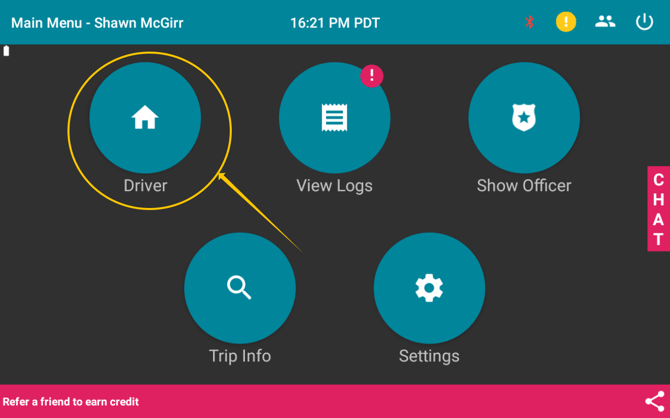
Driver Screen
Once you're in the Driver Screen, you'll be able to set the Duty Statuses. Here you can view basic timers for how much driving/on-duty/cycle time you have left.
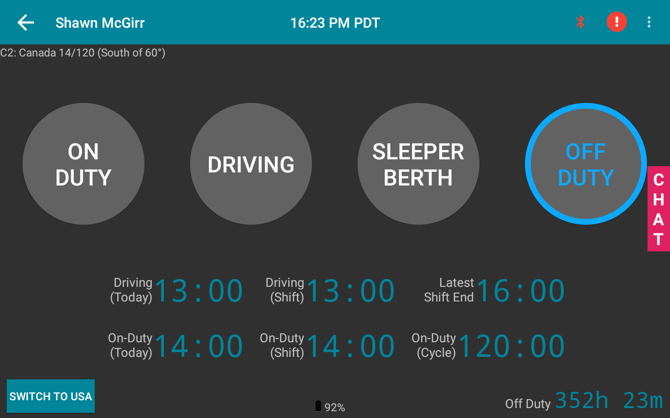
Selecting Duty Statuses
Whenever you are in a duty status, select that duty status button. For example, when you are on-duty, tap the On-Duty button. An annotations screen should pop up.
On the annotations screen, select the appropriate annotation for that duty status. If you have any more comments, enter it in the comments section.
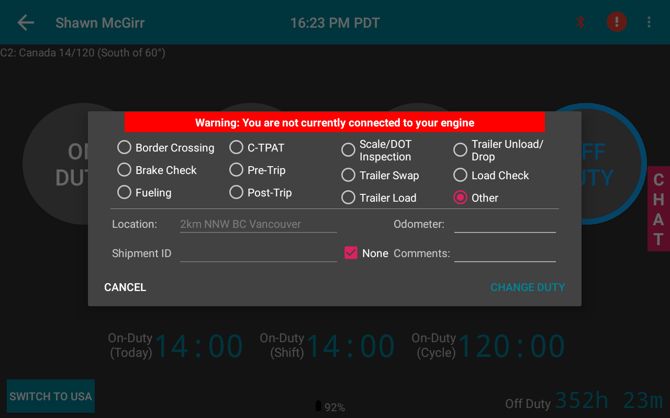
And that is it! From recording duty statuses, your logs will automatically be created.