Who is this article for? Standalone Tracking customers.
Note: Tracking integration within emdecs one is currently partial. Some portal features are only accessible through the standalone Tracking portal. Where noted, follow the standalone steps.
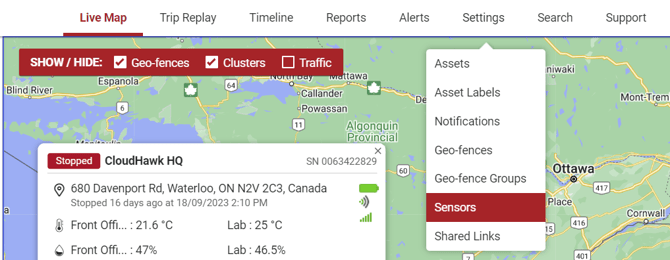
Hover your cursor over Settings on the top navigation bar and click Sensors.
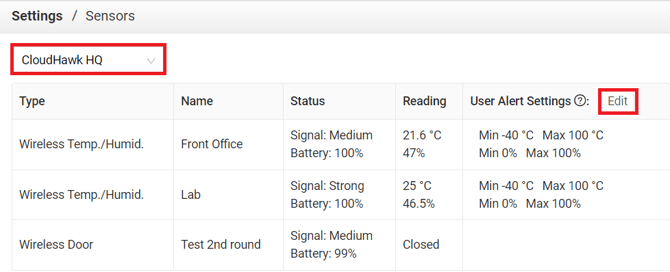
Select an asset from the list in the top-right and you'll see all sensors configured for that asset, along with current readings and a summary of configured alerts. To configure alerts, click the Edit button beside User Alert Settings.
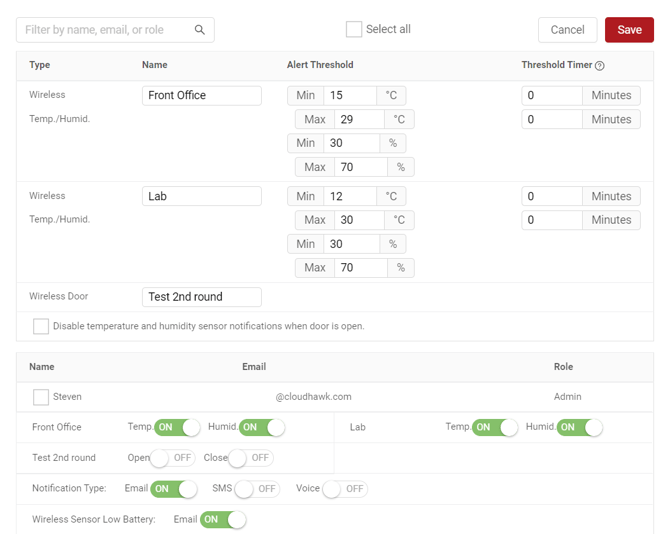
From here, you can configure various alert thresholds depending on the type of sensor(s) and determine who should receive alerts and how, below. In the example below, Steven will receive an email if either of the temperature sensors reports a reading outside the configured ranges, or if a sensor reports a low battery.
When you’re done, click Save.